Authentication.
Every sparx API request is authenticated with a Bearer token. For server-to-server integrations that token is an API key: a tenant-scoped secret you create once in the dashboard and send on every call.
Overview
sparx authenticates every request from the Authorization: Bearer header. There are two kinds of bearer token:
- API keys (
sk_live_…): long-lived secrets you create for an integration. This is what your code uses. - Dashboard tokens: short-lived JWTs the dashboard issues for a signed-in staff user. You won’t handle these directly.
A request with no Authorization header is treated as anonymous: endpoints that require auth reject it with 401.
Create an API key
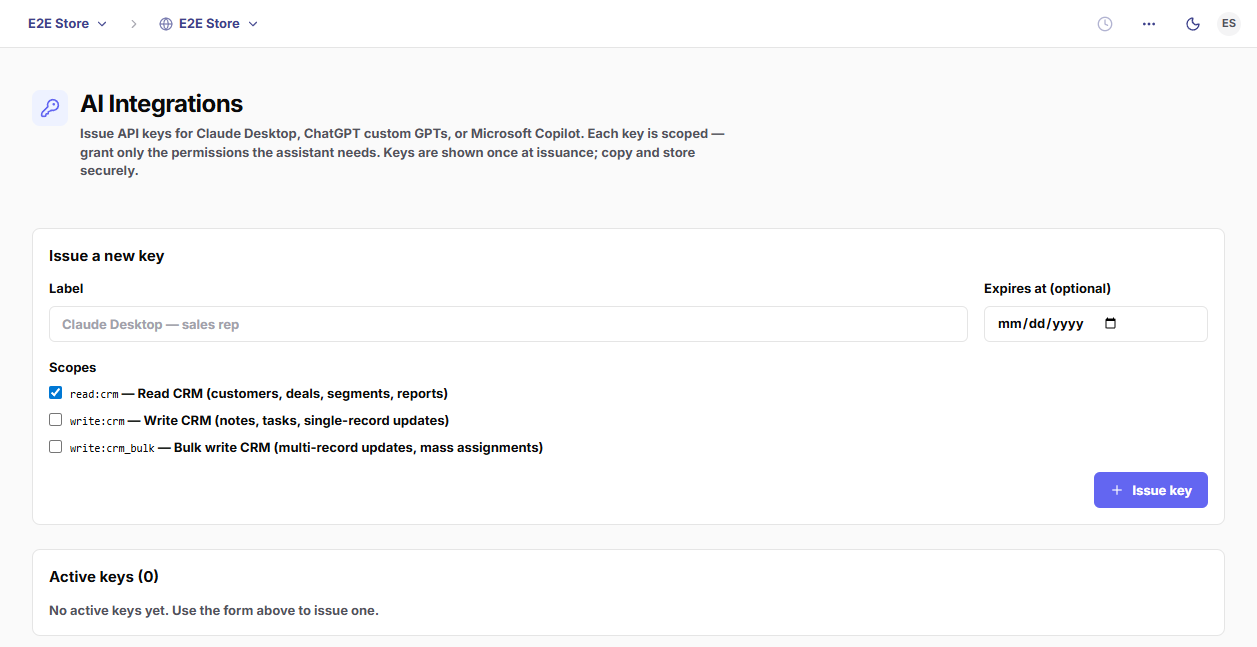
In your dashboard, open Settings → AI integrations and create a key. The full secret is shown exactly once at creation. Copy it then and store it as SPARX_KEY in your environment. sparx keeps only a hash, so it can never show you the secret again.
sk_live_ key can read and write your tenant’s data, never ship it in a browser bundle, mobile app, or public repo. For client-side or AI-agent access, use the MCP server or a scoped key behind your own backend.Authenticate a request
Send the key as a bearer token on every call:
Authorization: Bearer sk_live_a1b2c3d4_9f8e7d6c5b4a39281706f5e4d3c2b1a0
A quick way to confirm a key works is to call /v1/me, which returns the authenticated actor and tenant:
curl https://api.sparx.works/v1/me \
  -H "Authorization: Bearer $SPARX_KEY"

# 200 → the key is valid and resolves to your tenant
# 401 → missing, malformed, revoked, or expired key
Key format & storage
An API key has three parts:
sk_live_a1b2c3d4_9f8e7d6c5b4a39281706f5e4d3c2b1a0
└──┬──┘ └──┬───┘ └──────────────┬───────────────┘
 prefix   key id              secret
(stored only as a SHA-256 hash)sk_live_: a fixed public prefix that identifies the token as a live API key.- key id: a short public identifier sparx stores in the clear and uses to look the key up.
- secret: the half that proves you hold the key. sparx stores only its SHA-256 hash and compares in constant time, so a database leak never exposes a usable key.
Tenant scope, roles & scopes
A key belongs to exactly one tenant. That tenant context travels with every request the key makes. You never pass a tenant_id, and a key physically cannot reach another tenant’s data: isolation is enforced underneath the API by PostgreSQL Row-Level Security (see Core concepts).
Within its tenant, an API key acts with the editor role. It can read and write business data, but not perform owner/admin-only operations (like managing other staff or, for example, creating webhook subscriptions, which require admin). Keys also carry scopes that narrow what a given key may do; scope enforcement happens at the endpoint, so a key without a capability is refused even within its role.
viewer → editor → admin → owner. API keys are editor; staff users in the dashboard hold one of the four.Rotation & revocation
Keys are long-lived but revocable. From Settings → AI integrations you can revoke a key immediately: the next request it makes fails with 401. A key may also carry an expiry, after which it stops working automatically. To rotate, create a new key, deploy it, then revoke the old one. sparx tracks each key’s last-used time so you can spot stale keys before retiring them.
Auth errors
Two status codes cover authentication and authorization:
| Status | Code | Meaning |
|---|---|---|
401 | unauthorized | No Authorization header, or the key is malformed, revoked, or expired. The caller is not authenticated. |
403 | forbidden | The key is valid but lacks the required role or scope for this operation. |
Both come back in the standard error envelope: { "success": false, "error": { "code", "message" } }. With your key in hand, head to the Quickstart to make your first write, or wire up Webhooks.